
X
🐾 Coming from PetMatchPro 6.x? Version 8 adds real adoption analytics, similar-animal suggestions, SEO-friendly URLs, and overlay badges. See What's New →
PetMatchPro
  • Partners
    • AnimalsFirst
    • PetPoint
    • RescueGroups
  • What’s New
  • Shop
  • Demo
  • FAQ
  • Knowledge Base
  • About Us
  • Contact Us
  • My Account
  • Cart
Select Page
Green rocket icon for Getting Started documentation category

Getting Started

6
  • Activate Your License
  • Setup Wizard Walkthrough
  • Connecting Your Shelter System
  • Understanding License Tiers
  • Creating Your First Search Page
  • Creating Your First Detail Page
Blue code brackets icon for Shortcodes and Configuration documentation category

Shortcodes & Configuration

12
  • Shortcode Builder
  • [pmp-search] Reference
  • [pmp-details] Reference
  • [pmp-detail] Reference
  • [pmp-option] Reference
  • Parameters by License Tier
  • Common Shortcode Recipes
  • Pagination Setup
  • Excluding Values
  • Search Filter Button
  • Detail Button Hover Text
  • Search Card Hover Text
Purple palette icon for Templates and Design documentation category

Templates & Design

7
  • Search Templates Gallery
  • Detail Templates Gallery
  • Poster Templates
  • Theme Template Overrides
  • Color Customization
  • Font Size Customization
  • Detail Title Formats
Orange image with star icon for Icons and Overlays documentation category

Icons & Overlays

6
  • Understanding Pet Icons
  • Understanding Overlays
  • Icon Reference Gallery
  • Customizing Icon Display
  • Value-Based Icons
  • Icon Size Customization
Teal tag icon for Labels and Customization documentation category

Labels & Customization

3
  • Custom Labels Guide
  • Changing Labels via Filtering
  • Custom Currency & Date Formats
Blue funnel icon for Filters and Search documentation category

Filters & Search

5
  • Setting Up Search Filters
  • Species & Breed Filtering
  • Filter Value Management
  • Excluding Values via Filtering
  • Partner-Specific Filter Options
Violet chain link icon for Partner Integration Guides documentation category

Partner Guides

3
  • AnimalsFirst Integration Guide
  • PetPoint Integration Guide
  • RescueGroups Integration Guide
Red bar chart icon for Analytics and Tracking documentation category

Analytics & Tracking

7
  • Understanding PMP Analytics
  • GA4 Configuration
  • Google Tag Manager Setup
  • Leveraging Analytics
  • WP-Cron Requirements for PetMatchPro Analytics
  • Queue Health and Tools
  • Privacy and Data Retention
Amber wrench icon for Troubleshooting and FAQ documentation category

Troubleshooting

15
  • Common Error Messages
  • API Connection Issues
  • Template Not Found Errors
  • Theme Template Override Not Loading
  • Performance & Caching Best Practices
  • Animals Not Displaying
  • Stale Content / Cache Issues
  • Styling Conflicts
  • Empty Field Display
  • Analytics Queue Stuck or WP-Cron Not Running
  • Premium Feature Not Appearing After Upgrade
  • Troubleshoot the PetMatchPro Shortcode Builder
  • Reading PMP Debug Logs
  • wp-config.php Configuration Constants
  • How to Contact Support
Lightbulb icon representing PetMatchPro best practices guides for homepage layouts, button strategy, performance tuning, and template selection

Best Practices

10
  • Featuring Animals on Your Homepage
  • Adding Animals to Sidebars and Other Pages
  • Using Banners and Subtitles Effectively
  • Overlays and Icons for Quick Visual Cues
  • Writing Effective Detail Page Instructions
  • Button Configuration for Conversion
  • Optimizing Performance with API Caching
  • Customizing Typography and Icon Sizes
  • Lost and Found Search Best Practices
  • Template Selection Guide
View Categories
  • Home
  • Knowledge Base
  • Getting Started
  • Creating Your First Search Page

Creating Your First Search Page

2 min read

Creating Your First Search Page #

This guide walks you through creating a WordPress page that displays adoptable animals from your shelter management system.

Prerequisites #

Before you begin, make sure you have:

  • PetMatchPro installed and activated
  • Your shelter system API credentials entered (see Connecting Your Shelter System)

Step-by-Step Setup #

1. Create a New Page #

  1. In your WordPress admin, go to Pages > Add New.
  2. Give your page a title, such as “Adoptable Animals” or “Available Pets”.

2. Add the Search Shortcode #

Add the following shortcode to the page content:

[pmp-search]

That’s it! This basic shortcode displays all adoptable animals using your default search template.
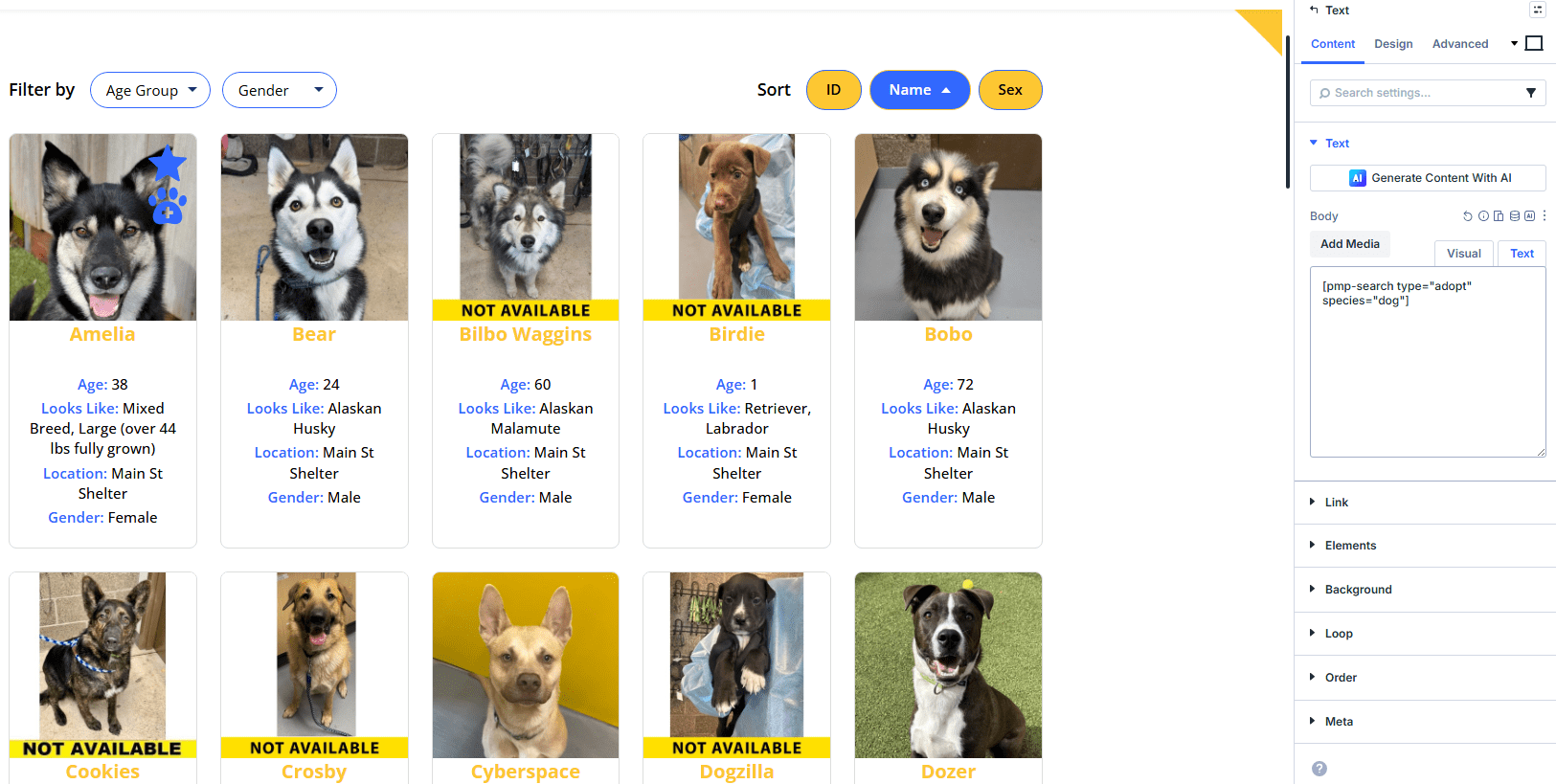
WordPress page editor with the pmp-search shortcode entered in the content area

3. Publish the Page #

Click Publish and then View Page to see your search results.
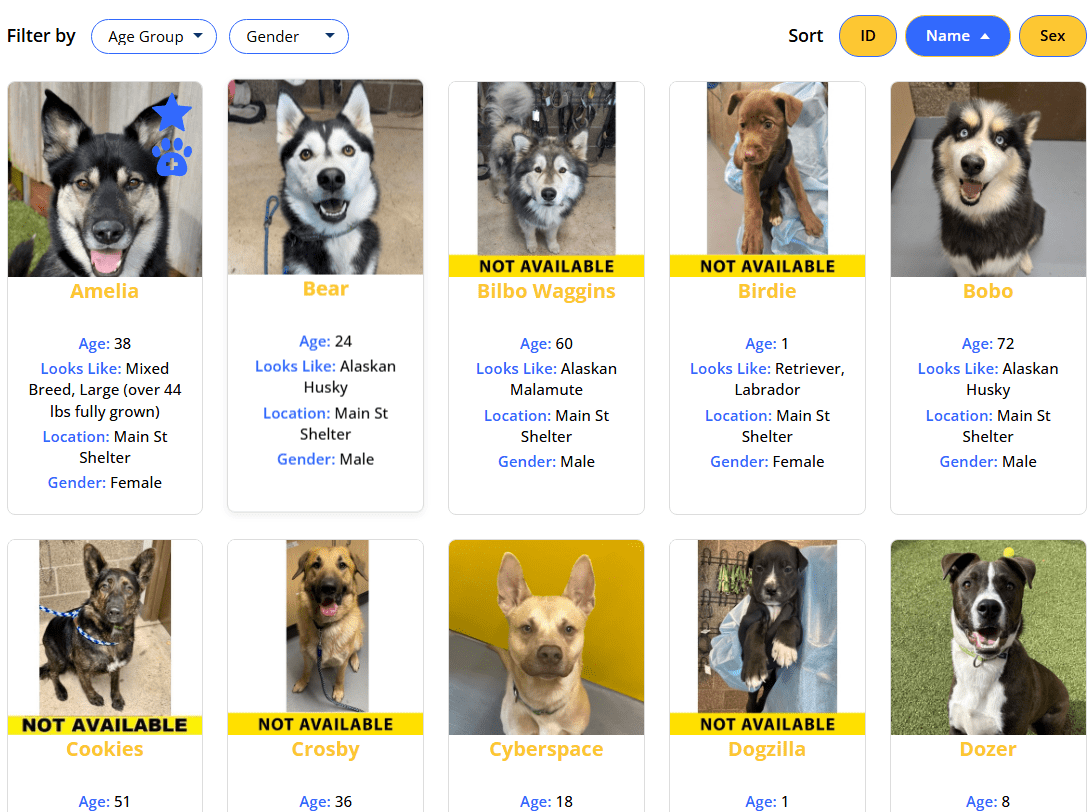
Live search results page displaying adoptable animal cards with photos and details

Basic Customization #

You can customize the search display by adding parameters to the shortcode:

Show Specific Fields #

Use the details parameter to control which animal fields appear:

[pmp-search details="Name,Breed,Sex,Age"]

Filter by Species #

Use the type parameter with the species filter to show only specific animals:

[pmp-search filter="species" type="adopt"]

Choose a Search Template #

If you have a Junior or Preferred license, you can select a different template:

[pmp-search template="adopt-search-carousel"]

Requires Junior license or higher.

Enable Search Filters #

Let visitors filter results by species, breed, and other criteria:

[pmp-search filter="enable"]

Example Shortcodes #

Basic adoption search:

[pmp-search type="adopt"]

Adoption search with custom fields:

[pmp-search type="adopt" details="Name,Breed,Sex,Age,Photo"]

Dogs only:

[pmp-search type="adopt" species="Dog"]

Adding to Your Menu #

After publishing, add the page to your site navigation:

  1. Go to Appearance > Menus.
  2. Select your search page from the Pages list.
  3. Click Add to Menu.
  4. Click Save Menu.

Next Steps #

  • [pmp-search] Reference — Full parameter reference
  • Creating Your First Detail Page — Set up individual animal profiles
  • Common Shortcode Recipes — Copy-paste examples for common setups
Creating Your First Search Page ultima modifica: 2026-03-24T11:15:32-04:00 da PetMatchPro
Updated on March 28, 2026

What are your Feelings

  • Happy
  • Normal
  • Sad

Share This Article :

  • Facebook
  • X
  • LinkedIn
  • Pinterest
Understanding License TiersCreating Your First Detail Page

Submit a Comment Cancel reply

Your email address will not be published. Required fields are marked *

Table of Contents
  • Creating Your First Search Page
    • Prerequisites
    • Step-by-Step Setup
      • 1. Create a New Page
      • 2. Add the Search Shortcode
      • 3. Publish the Page
    • Basic Customization
      • Show Specific Fields
      • Filter by Species
      • Choose a Search Template
      • Enable Search Filters
    • Example Shortcodes
    • Adding to Your Menu
    • Next Steps

© Copyright 2018-2026 by PetMatchPro, All Rights Reserved

  • Privacy Policy
  • Terms of Use
  • Disclaimer
  • Login