
RescueGroups Integration Guide #
This guide covers everything specific to using PetMatchPro with RescueGroups, including the dual-credential setup and the adopt-only scope.
API Setup #
RescueGroups uses a JSON-based API and requires two credentials: an API key and an Organization ID.
- Obtain your API key and Organization ID from your RescueGroups account.
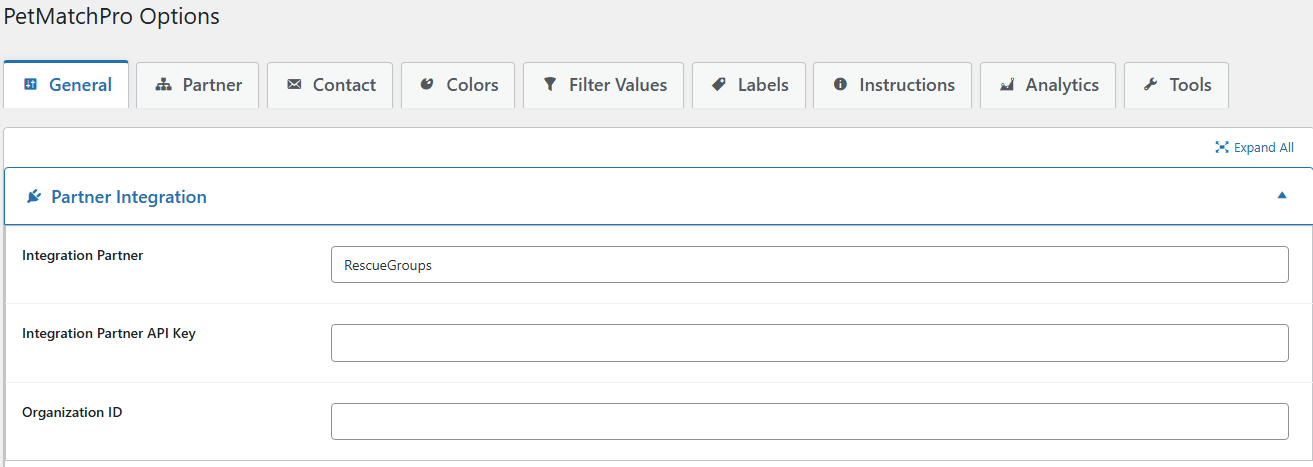
- In WordPress, go to PetMatchPro > General Options.
- Select RescueGroups from the Integration Partner dropdown.
- Enter your API Key.
- Enter your Organization ID.
- Click Apply Changes.
Finding Your Organization ID #
Your Organization ID is a numeric identifier for your organization within RescueGroups. You can find it by:
- Logging into your RescueGroups account and checking your account profile
- Looking at your RescueGroups dashboard URL (the number in the URL is often your org ID)
- Contacting RescueGroups support
The Organization ID is required – PetMatchPro uses it to filter API results to only your organization’s animals.
Available Method Types #
| Method | License | Description |
|---|---|---|
| Adopt | Basic | Adoptable animals |
Important: RescueGroups supports the adopt method type only. Lost, found, list, and preferred methods are not available. If you attempt to use an unsupported type, PetMatchPro displays a notice explaining which types are supported.
Available Templates #
Search Templates #
adopt-search-default.php– Default grid (Basic)adopt-search-carousel.php– Carousel slider (Junior)adopt-search-compact.php– Compact cards (Junior)adopt-search-structured.php– Structured grid (Junior)adopt-search-hero.php– Single hero image for homepage/banner zones (Junior)
Detail Templates #
adopt-default.php– Default (Basic)adopt-cpa.php– Community pet adoption style (Junior)adopt-similar.php– Default with similar animals (Junior)adopt-details-navigation.php– With page navigation (Junior)adopt-details-navigation-similar.php– Navigation + similar animals (Junior)adopt-celebration-similar.php– Celebration with similar animals (Junior)
Poster Templates #
universal-details-poster.php– Standard poster (Basic)
RescueGroups-Specific Notes #
CPA Template #
The adopt-cpa.php detail template is exclusive to RescueGroups, providing a community pet adoption-style layout.
Dynamic Banner Source Field #
Requires Junior license. The RescueGroups animalstatus field can drive a Dynamic Banner on search cards – map each status value to its own banner label and optional color, with a default fallback for unmatched values.
API Behavior #
- RescueGroups uses HTTP POST requests (not GET) for API calls
- API timeout is set to 30 seconds
- Results are automatically filtered to your Organization ID
Filter Value Refresh #
Requires Preferred license. You can refresh breed and color filter values directly from the RescueGroups API using the “Refresh Filter Values” button in the Filter Values tab.
Error Messages #
If a RescueGroups search or detail page renders with a red error block instead of animals, the message tells you what to fix:
| Public message | What it means | What to do |
|---|---|---|
| Connection Error: Unable to reach animal database: [network error] | The cURL request to RescueGroups never completed – DNS failure, firewall block, or RescueGroups outage. PetMatchPro retries transient cURL errors automatically before showing this. | Try again in a few minutes. If it persists, check your hosting provider’s outbound HTTP rules. |
| Authentication Error: RescueGroups rejected the request (HTTP 401). Verify your API key in general Settings. | RescueGroups received the request but rejected your credentials. Most common causes: typo on paste, expired key, or wrong Organization ID. | Go to PetMatchPro > General Options and re-enter both the API key and Organization ID. Click Apply Changes. |
| API Error: RescueGroups returned HTTP [code]. The service may be temporarily unavailable. | RescueGroups returned a non-401/403 server error. | Wait and retry. If it persists, contact RescueGroups support. |
| API Error: RescueGroups returned an error: [error from RescueGroups] | RescueGroups returned 200 OK but the JSON body’s status field indicated an error condition. |
The error text comes straight from RescueGroups – it usually identifies the problem (invalid org ID, unsupported filter, etc.). Adjust the configuration accordingly. |
| Parse Error: RescueGroups returned a response that could not be parsed as JSON ([json error]). This is usually a temporary API issue; if it persists, verify your API key in general Settings. | RescueGroups returned a 200 OK but the body wasn’t valid JSON. Genuinely rare. | Refresh the page once. If the error persists across multiple refreshes, treat it like an Authentication Error and re-verify both credentials. |
With WP_DEBUG enabled, every error path also writes a structured entry to your debug log with the HTTP status code, the API method that was called, and the first 200 characters of RescueGroups’ response body. See the Reading PMP Debug Logs article for how to find and interpret these entries.
Feature Comparison with Other Partners #
| Feature | RescueGroups | PetPoint | AnimalsFirst |
|---|---|---|---|
| Method types | Adopt only | Adopt, Lost, Found, List | Adopt, Lost, Found, Preferred |
| Credentials | API Key + Org ID | API Key | API Key (+ optional source) |
| API format | JSON | XML | JSON |
| Search templates | 5 | 9 | 8 |
| Detail templates | 6 | 10 | 12 |
Next Steps #
- Connecting Your Shelter System – Quick setup steps
- Partner-Specific Filter Options – Available filters for RescueGroups
- API Connection Issues – Troubleshoot connections


