X
🐾 Coming from PetMatchPro 6.x? Version 8 adds real adoption analytics, similar-animal suggestions, SEO-friendly URLs, and overlay badges. See What's New →
PetMatchPro
  • Partners
    • AnimalsFirst
    • PetPoint
    • RescueGroups
  • What’s New
  • Shop
  • Demo
  • FAQ
  • Knowledge Base
  • About Us
  • Contact Us
  • My Account
  • Cart
Select Page
Green rocket icon for Getting Started documentation category

Getting Started

6
  • Activate Your License
  • Setup Wizard Walkthrough
  • Connecting Your Shelter System
  • Understanding License Tiers
  • Creating Your First Search Page
  • Creating Your First Detail Page
Blue code brackets icon for Shortcodes and Configuration documentation category

Shortcodes & Configuration

12
  • Shortcode Builder
  • [pmp-search] Reference
  • [pmp-details] Reference
  • [pmp-detail] Reference
  • [pmp-option] Reference
  • Parameters by License Tier
  • Common Shortcode Recipes
  • Pagination Setup
  • Excluding Values
  • Search Filter Button
  • Detail Button Hover Text
  • Search Card Hover Text
Purple palette icon for Templates and Design documentation category

Templates & Design

7
  • Search Templates Gallery
  • Detail Templates Gallery
  • Poster Templates
  • Theme Template Overrides
  • Color Customization
  • Font Size Customization
  • Detail Title Formats
Orange image with star icon for Icons and Overlays documentation category

Icons & Overlays

6
  • Understanding Pet Icons
  • Understanding Overlays
  • Icon Reference Gallery
  • Customizing Icon Display
  • Value-Based Icons
  • Icon Size Customization
Teal tag icon for Labels and Customization documentation category

Labels & Customization

3
  • Custom Labels Guide
  • Changing Labels via Filtering
  • Custom Currency & Date Formats
Blue funnel icon for Filters and Search documentation category

Filters & Search

5
  • Setting Up Search Filters
  • Species & Breed Filtering
  • Filter Value Management
  • Excluding Values via Filtering
  • Partner-Specific Filter Options
Violet chain link icon for Partner Integration Guides documentation category

Partner Guides

3
  • AnimalsFirst Integration Guide
  • PetPoint Integration Guide
  • RescueGroups Integration Guide
Red bar chart icon for Analytics and Tracking documentation category

Analytics & Tracking

7
  • Understanding PMP Analytics
  • GA4 Configuration
  • Google Tag Manager Setup
  • Leveraging Analytics
  • WP-Cron Requirements for PetMatchPro Analytics
  • Queue Health and Tools
  • Privacy and Data Retention
Amber wrench icon for Troubleshooting and FAQ documentation category

Troubleshooting

15
  • Common Error Messages
  • API Connection Issues
  • Template Not Found Errors
  • Theme Template Override Not Loading
  • Performance & Caching Best Practices
  • Animals Not Displaying
  • Stale Content / Cache Issues
  • Styling Conflicts
  • Empty Field Display
  • Analytics Queue Stuck or WP-Cron Not Running
  • Premium Feature Not Appearing After Upgrade
  • Troubleshoot the PetMatchPro Shortcode Builder
  • Reading PMP Debug Logs
  • wp-config.php Configuration Constants
  • How to Contact Support
Lightbulb icon representing PetMatchPro best practices guides for homepage layouts, button strategy, performance tuning, and template selection

Best Practices

10
  • Featuring Animals on Your Homepage
  • Adding Animals to Sidebars and Other Pages
  • Using Banners and Subtitles Effectively
  • Overlays and Icons for Quick Visual Cues
  • Writing Effective Detail Page Instructions
  • Button Configuration for Conversion
  • Optimizing Performance with API Caching
  • Customizing Typography and Icon Sizes
  • Lost and Found Search Best Practices
  • Template Selection Guide
View Categories
  • Home
  • Knowledge Base
  • Icons & Overlays
  • Customizing Icon Display

Customizing Icon Display

2 min read

Customizing Icon Display #

Requires Junior license or higher.

PetMatchPro gives you control over how many icons and overlays display, where overlays are positioned, what text appears in tooltips, and what colors icons use.

Icon Settings #

Search Icons #
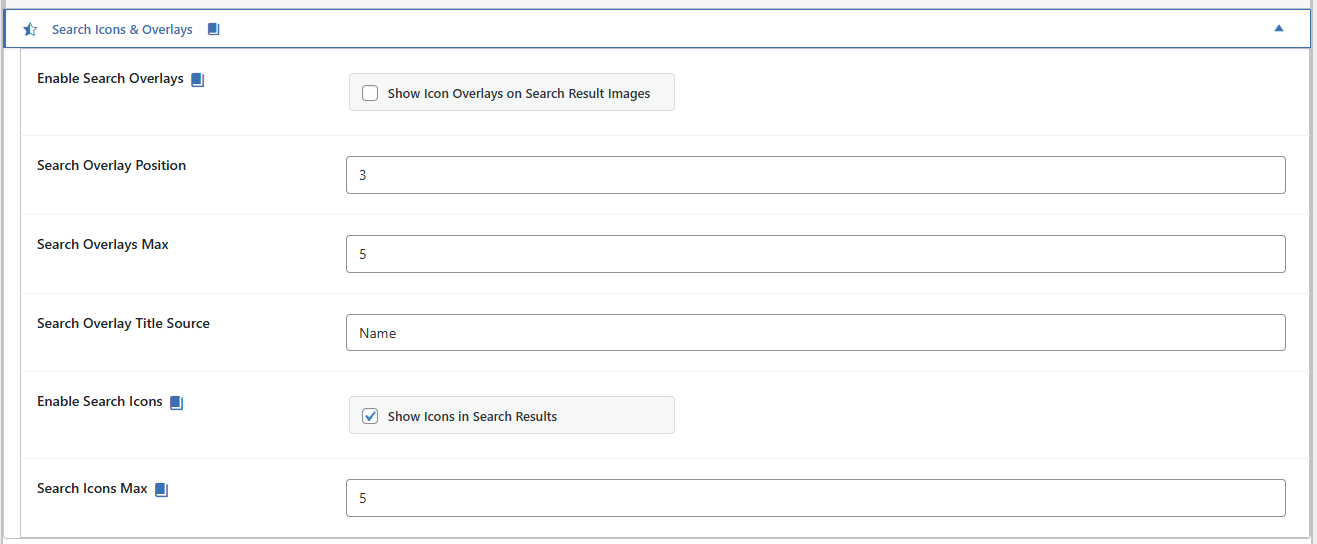
PetMatchPro General Options Search Icons & Overlays accordion showing six settings - Enable Search Overlays checkbox (unchecked), Search Overlay Position (3), Search Overlays Max (5), Search Overlay Title Source (Name), Enable Search Icons checkbox (checked), and Search Icons Max (5) - with premium badge indicators on gated fields.

Setting Location Description
Enable Search Icons General Options Turn icons on/off for search result cards
Search Icons Max General Options Maximum number of icons per animal in search results (1-10)

Detail Icons #

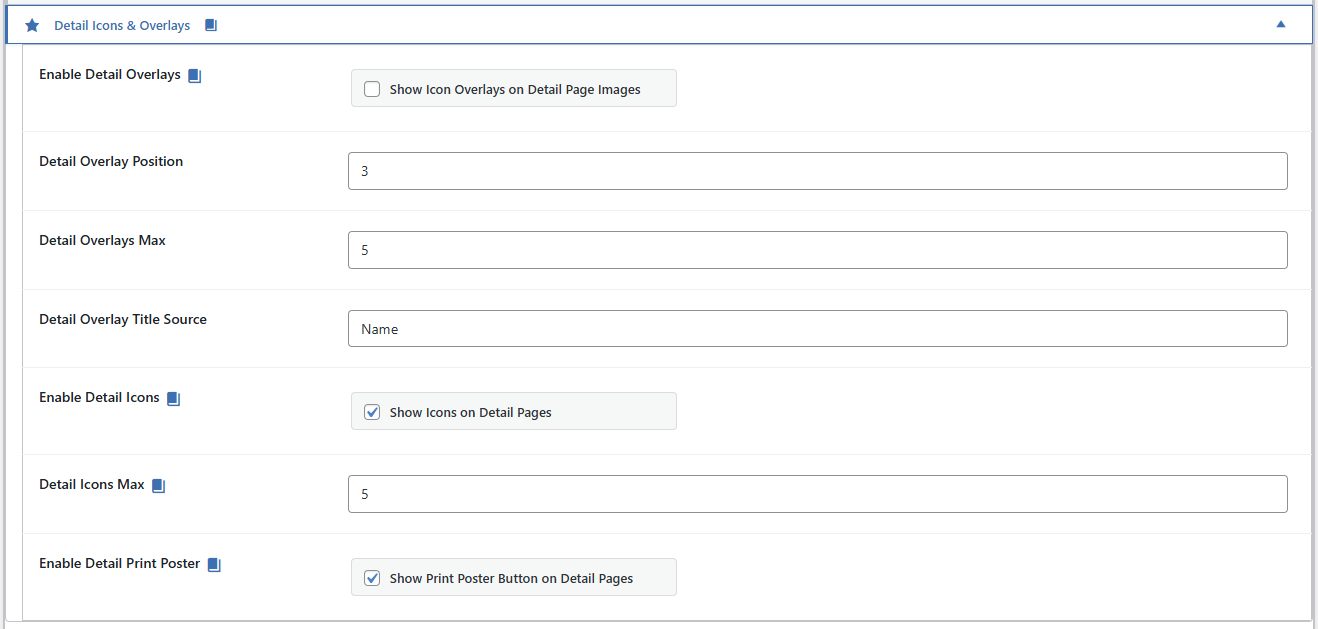
PetMatchPro General Options Detail Icons & Overlays accordion showing seven settings - Enable Detail Overlays checkbox (unchecked), Detail Overlay Position (3), Detail Overlays Max (5), Detail Overlay Title Source (Name), Enable Detail Icons checkbox (checked), Detail Icons Max (5), and Enable Detail Print Poster checkbox (checked) - with premium badge indicators on gated fields.

Setting Location Description
Enable Detail Icons General Options Turn icons on/off for detail pages
Detail Icons Max General Options Maximum number of icons on the detail page (1-10)

PetMatchPro General Options Detail Icons & Overlays accordion showing seven settings - Enable Detail Overlays checkbox (unchecked), Detail Overlay Position (3), Detail Overlays Max (5), Detail Overlay Title Source (Name), Enable Detail Icons checkbox (checked), Detail Icons Max (5), and Enable Detail Print Poster checkbox (checked) - with premium badge indicators on gated fields.

Overlay Settings #

Setting Description Options
Enable Search Overlays Turn overlays on/off for search results Yes / No
Enable Detail Overlays Turn overlays on/off for detail pages Yes / No
Max Overlays Maximum overlays per photo 1-10
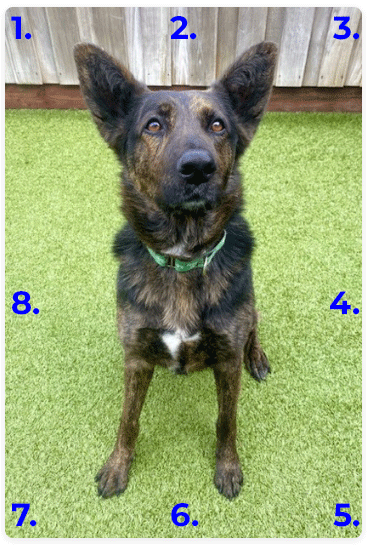
Overlay Position Where overlays appear on the photo 1-8 (see positions table below)
Overlay Title Source What text shows in the overlay tooltip name or label

Overlay Positions #

Diagram showing all eight overlay icon positions on a sample pet photo - position 1 (top-left), position 2 (top-center), position 3 (top-right), position 4 (middle-right), position 5 (bottom-right), position 6 (bottom-center), position 7 (bottom-left), and position 8 (middle-left) - numbered in blue on each corner and edge of the image.

Position Location
1 Top-Left
2 Top-Center
3 Top-Right
4 Middle-Right
5 Bottom-Right
6 Bottom-Center
7 Bottom-Left
8 Middle-Left

Overlay Title Source #

The title source controls what visitors see when they hover over an overlay:

  • name (default) – Uses the animal’s name: “Buddy is Spayed/Neutered”
  • label – Uses the icon label only: “Spayed/Neutered”

Shortcode Overrides #

You can override admin settings on a per-page basis using shortcode parameters:

[pmp-search type="adopt" icon="enable" icons="4" overlay="enable" overlays="3" overlay_position="3"]
[pmp-details icon="enable" icons="6" overlay="enable" overlays="4" overlay_position="1"]

Overlay Filter #

Limit which icons appear as overlays by specifying field names. Values must match the partner’s API field name, not a friendly label – see the field-name table in Understanding Overlays.

Example for an AnimalsFirst site:

[pmp-search type="adopt" overlay="enable" overlay_filter="altered,good_with_cats,good_with_dogs"]

Only icons matching the listed fields will appear as overlays.

Icon Colors #

Icon and overlay colors are configured in the Colors tab:
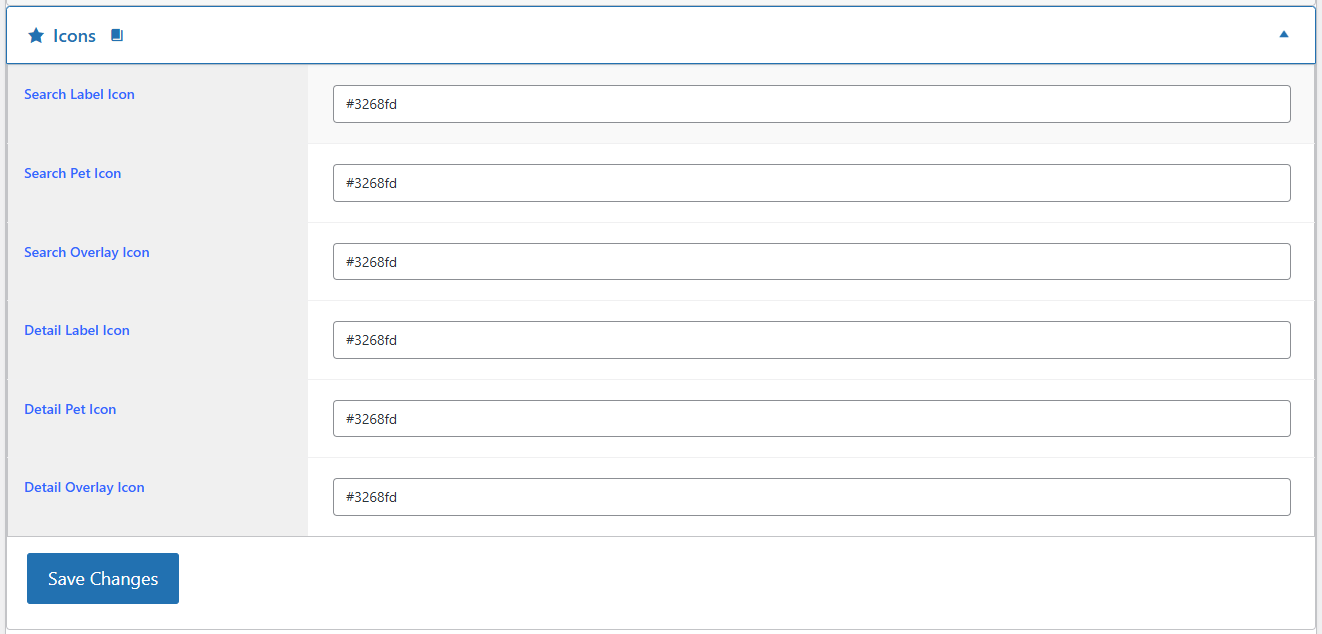
PetMatchPro Options Colors tab showing the Icons accordion expanded with six hex color input fields - Search Label Icon, Search Pet Icon, Search Overlay Icon, Detail Label Icon, Detail Pet Icon, and Detail Overlay Icon - all set to #3268fd (blue), with a Save Changes button below.

  1. Go to PetMatchPro > Colors.
  2. Find the icon and overlay color fields.
  3. Enter hex color codes.
  4. Click Save Colors.

PetMatchPro generates CSS custom properties for icon colors (e.g., --pmp-icon-color), so changes apply across all templates automatically.

Recommended Settings #

Context Icons Max Overlays Max Position
Search results 4-6 2-3 3 (Top-Right)
Detail pages 8-10 3-5 1 (Top-Left)

These are suggestions – adjust based on your templates and how much information you want to display at a glance.

Next Steps #

  • Value-Based Icons – Automatic icon matching from field values
  • Icon Reference Gallery – Browse all 120+ icons
  • Color Customization – Full color settings guide
Customizing Icon Display ultima modifica: 2026-03-25T18:40:54-04:00 da PetMatchPro
Updated on April 28, 2026

What are your Feelings

  • Happy
  • Normal
  • Sad

Share This Article :

  • Facebook
  • X
  • LinkedIn
  • Pinterest
Icon Reference GalleryValue-Based Icons

Submit a Comment Cancel reply

Your email address will not be published. Required fields are marked *

Table of Contents
  • Customizing Icon Display
    • Icon Settings
      • Search Icons
      • Detail Icons
    • Overlay Settings
      • Overlay Positions
      • Overlay Title Source
    • Shortcode Overrides
      • Overlay Filter
    • Icon Colors
    • Recommended Settings
    • Next Steps

© Copyright 2018-2026 by PetMatchPro, All Rights Reserved

  • Privacy Policy
  • Terms of Use
  • Disclaimer
  • Login