
Excluding Values via Filtering #
PetMatchPro lets you hide specific field values from appearing in search results. This is the right tool when you want a value like a status, breed, or species to never show up on your search pages, regardless of what the API returns.
Exclusion is configured per method type (Adopt, Lost, Found) in the General tab and applies site-wide to every search of that method.
License Availability #
| Method | License Required |
|---|---|
| Adopt | Basic |
| Lost | Junior |
| Found | Junior |
How to Configure #
- Go to PetMatchPro > General tab.
- Open the accordion for the method you want to configure (Adopt, Lost, or Found).
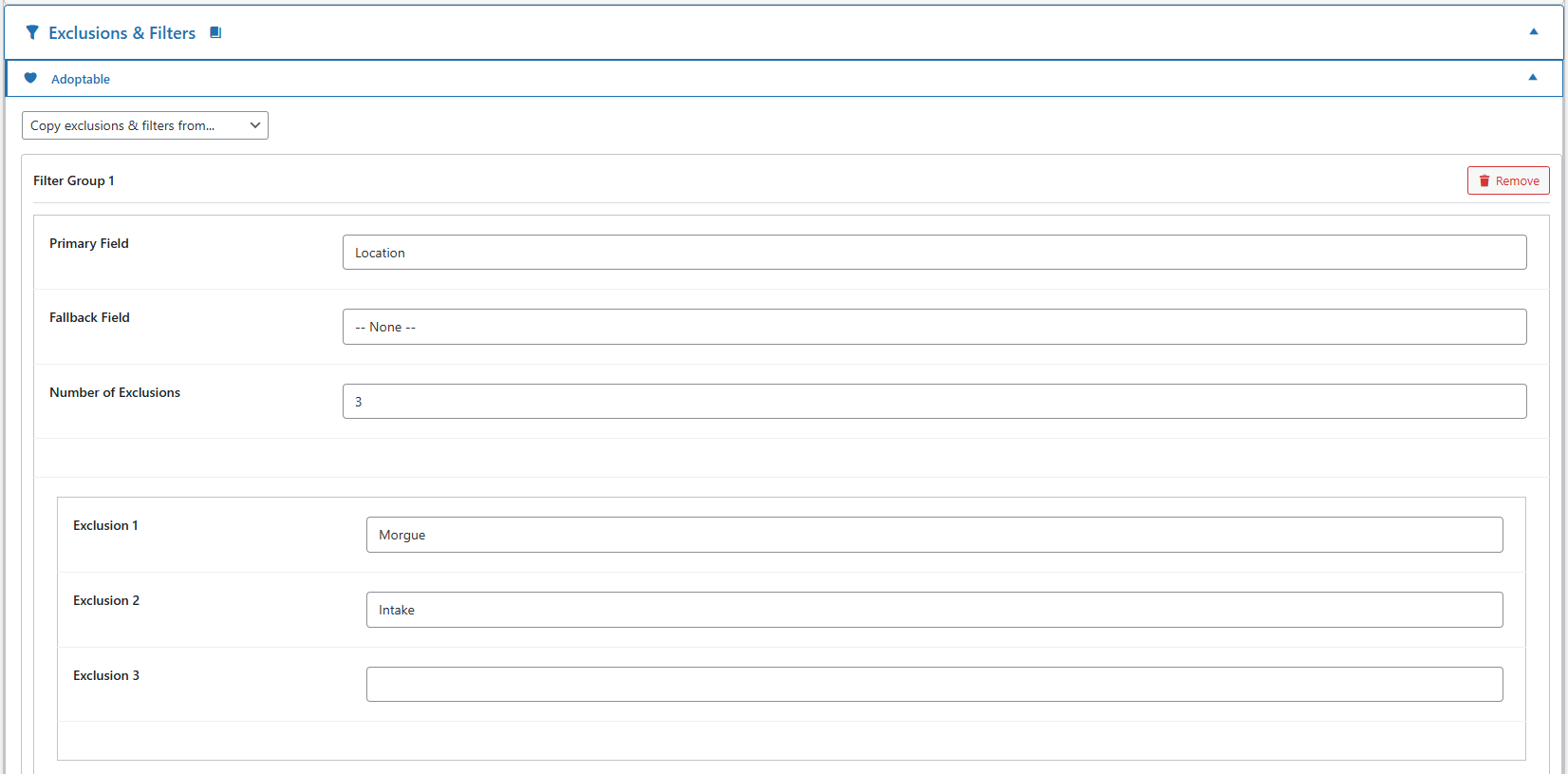
- Locate the Exclusion section for that method.
- Enter the value(s) you want to hide in the Exclusion 1, Exclusion 2, etc. fields. Match the value exactly as it appears in your shelter system.
- Click Save Changes.
Animals whose excluded field matches any value you’ve entered will be dropped from search results before they reach the page. The match is exact and case-sensitive.
What This Controls #
Exclusion in the General tab hides animals from search result output. The animal is filtered out before the cards render, so it never appears on the page.
This is different from the other two things admins often want to do with filters:
| You want to… | Use… | License |
|---|---|---|
| Hide animals from search results | General tab > Exclusion (this article) | Basic (Adopt) / Junior (Lost, Found) |
| Remove an entire filter dropdown from the search form (e.g., no Sex filter on Lost) | Partner tab > method accordion checkboxes — see Setting Up Search Filters | Varies by method |
| Customize the values inside a filter dropdown (relabel, hide individual options from the picker) | Filter Values tab — see Filter Value Management | Preferred |
Per-Page Exclusion (Shortcode) #
If you need to hide a specific animal from one page only (rather than site-wide), use the exclude shortcode parameter instead. It accepts a single animal ID and is most commonly used by the similar-animals grids on detail pages. See Excluding Values (Shortcode).
Availability by Partner #
| Partner | Adopt Exclusion | Lost Exclusion | Found Exclusion |
|---|---|---|---|
| PetPoint | Basic | Junior | Junior |
| AnimalsFirst | Basic | Junior | Junior |
| RescueGroups | Basic | — | — |
RescueGroups only supports the Adopt method, so Lost and Found exclusions do not apply.
Next Steps #
- Setting Up Search Filters — Choose which filter dropdowns appear per method
- Filter Value Management — Customize dropdown values (Preferred)
- Excluding Values (Shortcode) — Per-page single-animal exclusion
Requires Preferred license.
PetMatchPro lets you hide specific field values from search results using admin-level filter configuration. This is different from the shortcode exclude parameter — it applies site-wide to all pages using that filter.
Two Ways to Exclude Values #
| Method | Scope | License | Where Configured |
|---|---|---|---|
Shortcode exclude |
Single page only | Junior | In the shortcode on the page |
| Filter configuration | Site-wide | Preferred | PetMatchPro admin > Filter Values tab |
Using Filter Exclusions #
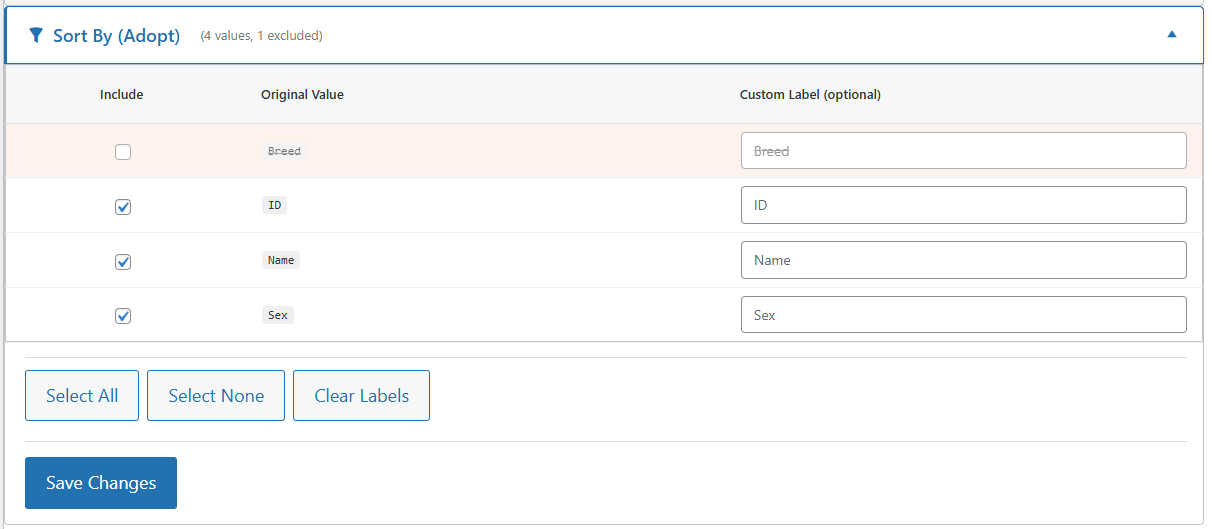
- Go to PetMatchPro > Filter Values tab.
- Find the field containing values you want to exclude.
- Click on the field to expand its value list.
- Mark the values you want to exclude.
- Click Save.
Excluded values will no longer appear in filter dropdowns across your entire site.
When to Use Each Method #
Use Shortcode exclude When: #
- You want different exclusions on different pages
- You’re creating a specialized page (e.g., “Small Animals” page that excludes dogs and cats)
- You have a Junior license
Example:
[pmp-search type="adopt" exclude="Hamster,Guinea Pig"]Use Filter Configuration When: #
- You want a value excluded everywhere on your site
- You want the value removed from filter dropdowns too
- You have a Preferred license
Availability by Partner #
| Partner | Filter Exclusion Available | License |
|---|---|---|
| PetPoint | Yes | Preferred |
| AnimalsFirst | Yes | Preferred |
| RescueGroups | Yes | Preferred |
Next Steps #
- Excluding Values (Shortcode) — Per-page exclusions with the
excludeparameter - Filter Value Management — Full filter value customization
- Setting Up Search Filters — Filter basics


