
X
🐾 Coming from PetMatchPro 6.x? Version 8 adds real adoption analytics, similar-animal suggestions, SEO-friendly URLs, and overlay badges. See What's New →
PetMatchPro
  • Partners
    • AnimalsFirst
    • PetPoint
    • RescueGroups
  • What’s New
  • Shop
  • Demo
  • FAQ
  • Knowledge Base
  • About Us
  • Contact Us
  • My Account
  • Cart
Select Page
Green rocket icon for Getting Started documentation category

Getting Started

6
  • Activate Your License
  • Setup Wizard Walkthrough
  • Connecting Your Shelter System
  • Understanding License Tiers
  • Creating Your First Search Page
  • Creating Your First Detail Page
Blue code brackets icon for Shortcodes and Configuration documentation category

Shortcodes & Configuration

12
  • Shortcode Builder
  • [pmp-search] Reference
  • [pmp-details] Reference
  • [pmp-detail] Reference
  • [pmp-option] Reference
  • Parameters by License Tier
  • Common Shortcode Recipes
  • Pagination Setup
  • Excluding Values
  • Search Filter Button
  • Detail Button Hover Text
  • Search Card Hover Text
Purple palette icon for Templates and Design documentation category

Templates & Design

7
  • Search Templates Gallery
  • Detail Templates Gallery
  • Poster Templates
  • Theme Template Overrides
  • Color Customization
  • Font Size Customization
  • Detail Title Formats
Orange image with star icon for Icons and Overlays documentation category

Icons & Overlays

6
  • Understanding Pet Icons
  • Understanding Overlays
  • Icon Reference Gallery
  • Customizing Icon Display
  • Value-Based Icons
  • Icon Size Customization
Teal tag icon for Labels and Customization documentation category

Labels & Customization

3
  • Custom Labels Guide
  • Changing Labels via Filtering
  • Custom Currency & Date Formats
Blue funnel icon for Filters and Search documentation category

Filters & Search

5
  • Setting Up Search Filters
  • Species & Breed Filtering
  • Filter Value Management
  • Excluding Values via Filtering
  • Partner-Specific Filter Options
Violet chain link icon for Partner Integration Guides documentation category

Partner Guides

3
  • AnimalsFirst Integration Guide
  • PetPoint Integration Guide
  • RescueGroups Integration Guide
Red bar chart icon for Analytics and Tracking documentation category

Analytics & Tracking

7
  • Understanding PMP Analytics
  • GA4 Configuration
  • Google Tag Manager Setup
  • Leveraging Analytics
  • WP-Cron Requirements for PetMatchPro Analytics
  • Queue Health and Tools
  • Privacy and Data Retention
Amber wrench icon for Troubleshooting and FAQ documentation category

Troubleshooting

15
  • Common Error Messages
  • API Connection Issues
  • Template Not Found Errors
  • Theme Template Override Not Loading
  • Performance & Caching Best Practices
  • Animals Not Displaying
  • Stale Content / Cache Issues
  • Styling Conflicts
  • Empty Field Display
  • Analytics Queue Stuck or WP-Cron Not Running
  • Premium Feature Not Appearing After Upgrade
  • Troubleshoot the PetMatchPro Shortcode Builder
  • Reading PMP Debug Logs
  • wp-config.php Configuration Constants
  • How to Contact Support
Lightbulb icon representing PetMatchPro best practices guides for homepage layouts, button strategy, performance tuning, and template selection

Best Practices

10
  • Featuring Animals on Your Homepage
  • Adding Animals to Sidebars and Other Pages
  • Using Banners and Subtitles Effectively
  • Overlays and Icons for Quick Visual Cues
  • Writing Effective Detail Page Instructions
  • Button Configuration for Conversion
  • Optimizing Performance with API Caching
  • Customizing Typography and Icon Sizes
  • Lost and Found Search Best Practices
  • Template Selection Guide
View Categories
  • Home
  • Knowledge Base
  • Labels & Customization
  • Custom Currency & Date Formats

Custom Currency & Date Formats

2 min read

Custom Currency & Date Formats #

PetMatchPro lets you configure how monetary values (like adoption fees) and dates are displayed on your search and detail pages. Both settings are available on all license tiers.

Currency Symbol #

The currency symbol setting controls which symbol appears next to monetary fields like adoption fees.

Changing the Currency Symbol #

  1. Go to PetMatchPro > General Options.
  2. Expand the Display Options > Formatting accordion.
  3. Choose your preferred currency from the Currency Symbol dropdown.
  4. Click Apply Changes.

The default is USD - US Dollar.
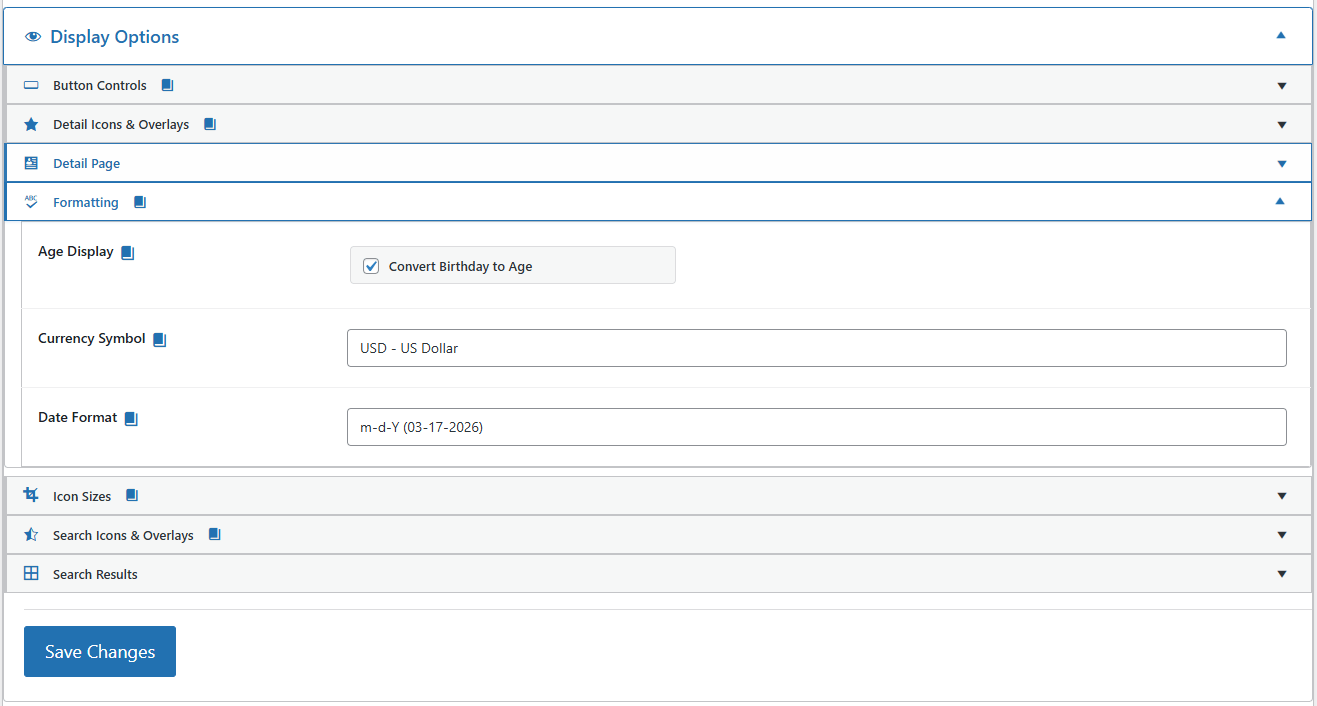
PetMatchPro General Options Display Options section showing the Formatting accordion expanded with three settings - Age Display checkbox (Convert Birthday to Age, checked), Currency Symbol dropdown set to USD - US Dollar, and Date Format dropdown set to m-d-Y (03-17-2026) - with collapsed accordions for Button Controls, Detail Icons & Overlays, Detail Page, Icon Sizes, Search Icons & Overlays, and Search Results visible above and below.

Available Currencies #

Five currencies are available in the dropdown. The selected code controls the symbol prefix shown next to monetary values like adoption fees:

Dropdown Value Symbol Displayed Example
USD - US Dollar $ $150.00
GBP - British Pound £ £150.00
EUR - Euro € €150.00
CAD - Canadian Dollar C$ C$150.00
AUD - Australian Dollar A$ A$150.00

Date Format #

The date format setting controls how date fields display throughout PetMatchPro – including intake dates, outcome dates, birthdays, and any other date values from your shelter system.

Changing the Date Format #

  1. Go to PetMatchPro > General Options.
  2. Expand the Display Options > Formatting accordion.
  3. Choose your preferred format from the Date Format dropdown.
  4. Click Apply Changes.

The default is m-d-Y (03-17-2026).

Available Date Formats #

Five date formats are available in the dropdown. The selected format applies to all date fields – intake date, outcome date, birthday, and any other date values from your shelter system.

Dropdown Value Example Output Description
m-d-Y 03-17-2026 Month-Day-Year (default, US style)
d-m-Y 17-03-2026 Day-Month-Year (UK / EU style)
Y-m-d 2026-03-17 Year-Month-Day (ISO 8601)
M d, Y Mar 17, 2026 Abbreviated month name
d M Y 17 Mar 2026 Day first, abbreviated month

Where These Settings Apply #

Currency and date format settings apply site-wide across all templates – search results, detail pages, and poster templates – and across all method types. There is no per-method or per-template override.

Next Steps #

  • Custom Labels Guide – Rename field labels
  • Color Customization – Adjust your visual theme
Custom Currency & Date Formats ultima modifica: 2026-03-25T18:54:59-04:00 da PetMatchPro
Updated on April 28, 2026

What are your Feelings

  • Happy
  • Normal
  • Sad

Share This Article :

  • Facebook
  • X
  • LinkedIn
  • Pinterest
Changing Labels via FilteringCustom Labels Guide

Submit a Comment Cancel reply

Your email address will not be published. Required fields are marked *

Table of Contents
  • Custom Currency & Date Formats
    • Currency Symbol
      • Changing the Currency Symbol
      • Available Currencies
    • Date Format
      • Changing the Date Format
      • Available Date Formats
    • Where These Settings Apply
    • Next Steps

© Copyright 2018-2026 by PetMatchPro, All Rights Reserved

  • Privacy Policy
  • Terms of Use
  • Disclaimer
  • Login