
Detail Title Formats & Location Handling #
Pet Match Pro automatically generates detail page titles, poster headings, and button labels based on the method type (adopt, lost, or found) and the data available for each animal. This article explains how those strings are built, what happens when data is missing, and how the poster splits location into a general heading and a specific footer.
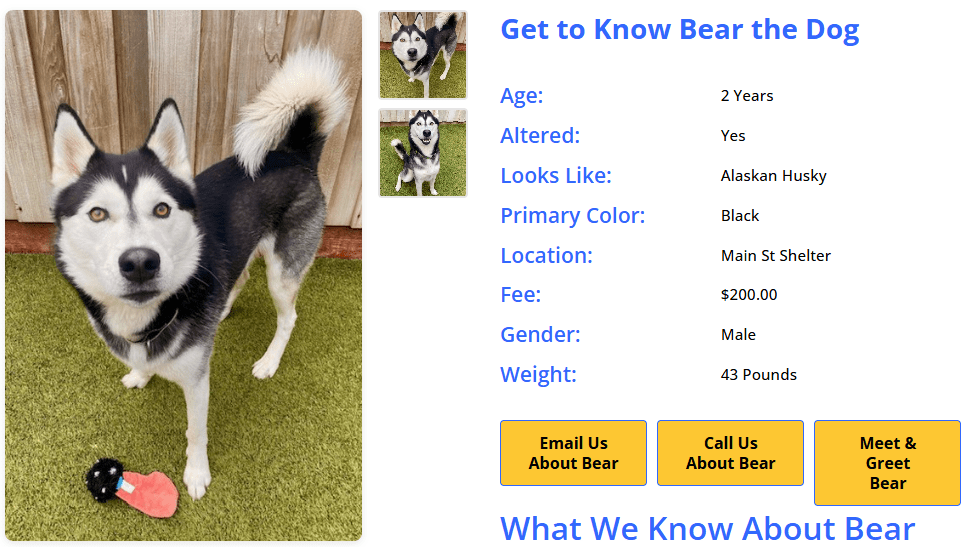
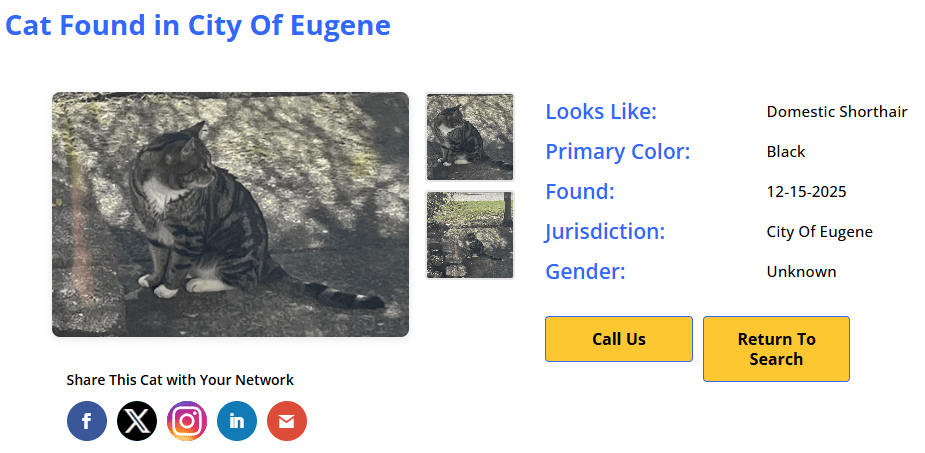
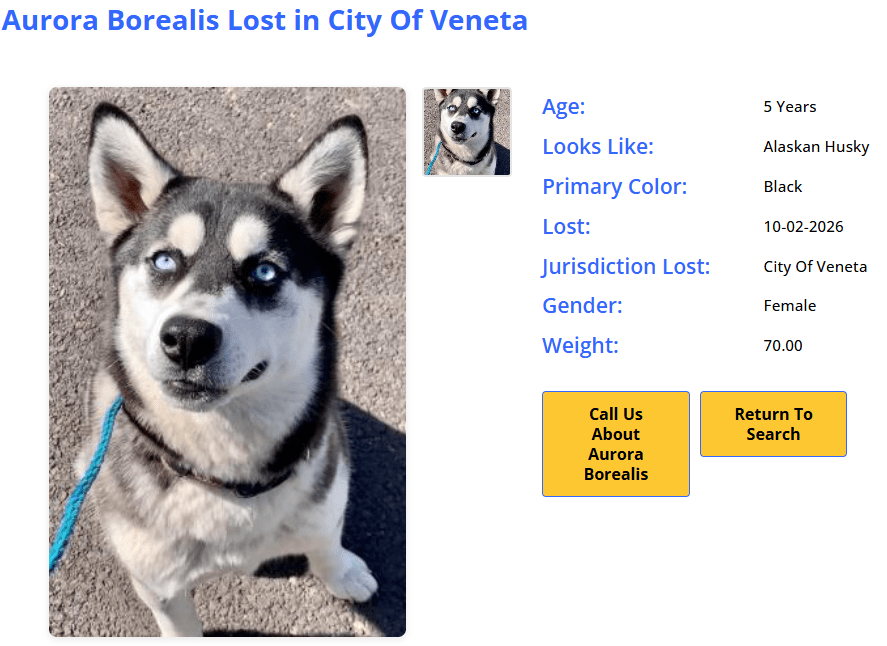
Detail Page Titles #
Every detail page renders a title inside an <h1 class="pmp-details-title"> element. The format varies by method type:
Adopt Titles #
| Priority | Format | Example |
|---|---|---|
| Name + species available | Get to Know {Name} the {Species} | Get to Know Bella the Dog |
| Name only | Get to Know {Name} | Get to Know Bella |
| Species only | Meet This {Species} | Meet This Dog |
| Nothing available | Meet This Pet | Meet This Pet |
Lost Titles #
Lost titles use a name-first format across all integration partners. Leading with the animal’s name is more actionable on a lost-pet notice than a species-first format.
| Priority | Format | Example |
|---|---|---|
| Name + location | {Name} Lost in {Location} | Blackie Lost in Eugene |
| Name, no location | {Name} Lost | Blackie Lost |
| No name + location | {Sex} {Species} Lost in {Location} | Male Dog Lost in Eugene |
| No name, no location | {Species} Lost | Dog Lost |
| Nothing available | Animal Lost | Animal Lost |
Found Titles #
Found titles always lead with sex and species. Found animals rarely have a known name, and using one would imply a known owner — which defeats the purpose of a found-pet notice.
| Priority | Format | Example |
|---|---|---|
| Sex + species + location | {Sex} {Species} Found in {Location} | Female Cat Found in Dallas |
| Sex + species, no location | {Sex} {Species} Found | Female Cat Found |
| Species only + location | {Species} Found in {Location} | Cat Found in Dallas |
| Nothing available | Animal Found | Animal Found |
Graceful Location Handling #
The in {Location} suffix is only appended when the plugin can resolve a location value. If no location data is available for the animal, the suffix is dropped entirely. Titles never display “in Not Defined” or “in Unknown”.
Shortcode Title Override #
The [pmp-details] shortcode’s title parameter overrides the auto-generated title:
title="Help Us Find Buddy"— displays that exact text.title=""— suppresses the title entirely (no heading rendered).- Omitted — auto-generates using the tables above.
See the [pmp-details] Reference — Title Behavior for full parameter documentation.
Poster Location: General vs. Specific #
Lost and found poster templates render location in two distinct zones, each using a different level of detail:
Poster Anatomy #
| Zone | Purpose | Location type | Example |
|---|---|---|---|
| Heading (top of poster) |
Scannable “at a glance” locator | General — jurisdiction, county, or city | Lost in Lane County Found in Cincinnati |
| CTA Footer (“Last Seen:” / “Found in:”) |
Actionable street-level detail | Specific — street address or full location string | Last Seen: Bonita Dr Found in: 1234 Main St |
When the specific location cannot be resolved (e.g., no street address on file), the footer automatically falls back to the general location so the printed flyer never shows a blank “Last Seen:” line.
PetPoint Location Resolution #
| Method | General (heading) | Specific (footer) |
|---|---|---|
| Lost | jurisdiction → lost city + state |
lostlocation → lostaddress → falls back to general |
| Found | jurisdiction → found city + state |
foundlocation → foundaddress → falls back to general |
| Adopt / List | jurisdiction → location |
N/A (adopt posters use a different layout) |
AnimalsFirst Location Resolution #
| Method | General (heading) | Specific (footer) |
|---|---|---|
| Lost / Found | intake_jurisdiction → city + state |
address_1 → long_address → google_formatted_address → falls back to general |
AnimalsFirst delivers address data as a nested object. The plugin automatically decomposes it into individual fields (address_1, city, state, zip) by parsing the adr_address semantic HTML or comma-splitting the long_address string. This decomposition runs on both search results and detail pages.
RescueGroups Location Resolution #
| Method | General (heading) | Specific (footer) |
|---|---|---|
| Adopt | city + state |
N/A (RescueGroups supports adopt only) |
Detail Page Titles Use the General Location #
The detail page title (outside the poster) always uses the general location — the same broad value shown in the poster heading. This keeps the title short and scannable, matching what visitors see when they first land on the page.
Button Labels for Nameless Animals #
Found and stray animals often have no human-given name — some shelter systems populate the name field with a numeric intake ID instead (e.g., “60100465”). When the plugin detects that the name is empty or purely numeric, button labels and the description heading automatically fall back to shorter forms that omit the name:
Before & After #
| Element | With Real Name | Without Real Name |
|---|---|---|
| Detail page title (lost) | Blackie Lost in Eugene | Female Dog Lost in Eugene |
| Detail page title (found) | Female Cat Found in Dallas | Female Cat Found in Dallas (unchanged — found never uses name) |
| Print Poster button | Print Blackie’s Poster | Print Poster |
| Call Us button | Call Us About Blackie | Call Us |
| Meet & Greet button | Meet & Greet Blackie | Meet & Greet |
| Email Us button | Email Us About Blackie | Email Us |
| Sponsor button | Sponsor Blackie’s Care | Sponsor Their Care |
| Description heading | About Blackie | About This Dog |
The description heading falls back to “About This {Species}” when a species is known, or “About This Animal” as a final fallback.
Title Tag Change: h2 → h1 #
As of version 8.5.0, all detail page titles render inside an <h1> element (previously, lost and found templates used <h2> while adopt used <h1>). The plugin’s CSS targets the .pmp-details-title class without qualifying the tag, so the visual appearance is unchanged on sites using the default plugin styles.
Theme authors: If your theme’s custom CSS targets h2.pmp-details-title specifically, update the selector to .pmp-details-title (unqualified) or h1.pmp-details-title.
Related Resources #
- [pmp-details] Reference — Full shortcode parameter documentation including the
titleparameter - Poster Templates — How to configure and print lost/found posters
- Empty Field Display — How the
hide_emptytoggle works across detail pages and posters - Detail Templates Gallery — Browse available detail templates


