
Understanding Overlays #
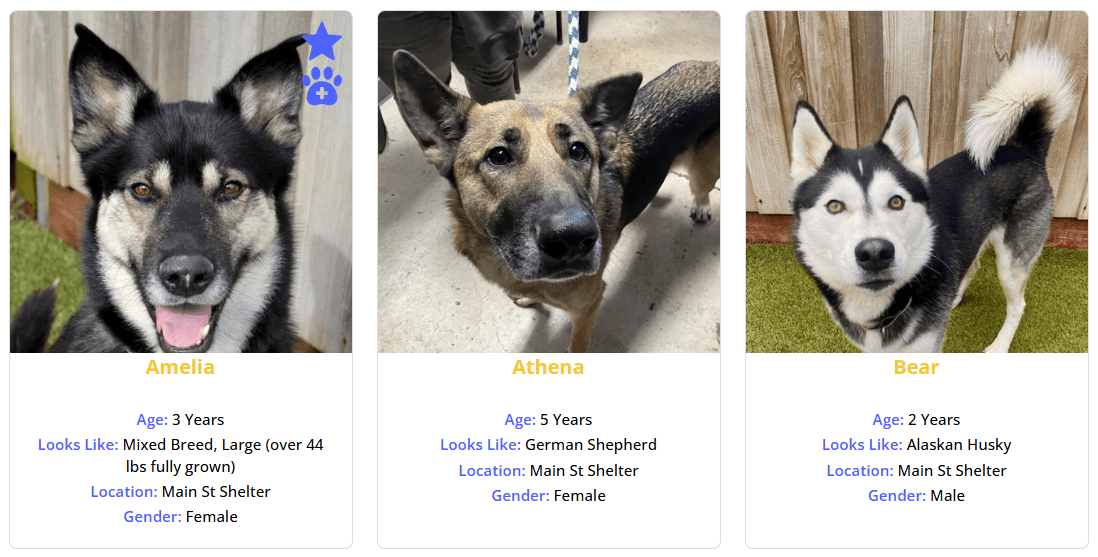
Overlays are icons displayed directly on an animal’s photo, giving visitors instant visual information about the animal’s status without reading any text.
Requires Junior license or higher.
How Overlays Work #
Overlays use the same icon system as regular pet icons, but they’re rendered on top of the animal’s primary photo. This makes them highly visible in search results where visitors are scanning quickly.
Overlays appear in both search results and detail pages, with separate configuration for each.
Position Options #
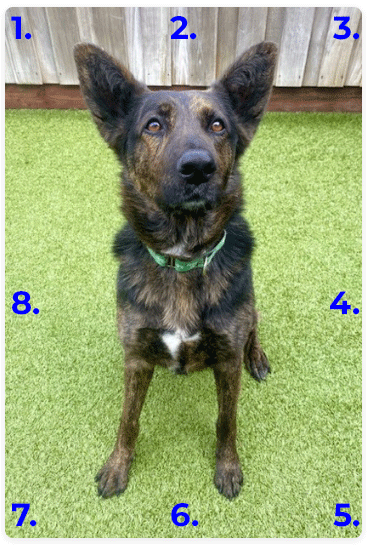
You can place overlays in 8 positions around the photo, numbered clockwise:
| Position | Location |
|---|---|
| 1 | Top-Left |
| 2 | Top-Center |
| 3 | Top-Right |
| 4 | Middle-Right |
| 5 | Bottom-Right |
| 6 | Bottom-Center |
| 7 | Bottom-Left |
| 8 | Middle-Left |
Enabling Overlays #
Via Admin Settings #
- Go to PetMatchPro > General Options.
- Find the Search Overlays or Detail Overlays setting.
- Set to Yes.
- Choose your preferred Overlay Position (1-8).
- Set the Max Overlays value (up to 10).
- Click Apply Changes.
Via Shortcode #
[pmp-search type="adopt" overlay="enable" overlays="3" overlay_position="3"][pmp-details overlay="enable" overlays="3" overlay_position="3"]Overlay Title Source #
When a visitor hovers over an overlay icon, a tooltip appears. The Overlay Title Source setting controls what text appears:
| Value | Behavior | Example |
|---|---|---|
name |
Uses the animal’s name in the title | “Buddy is Spayed/Neutered” |
label |
Uses the custom label from admin settings | “Spayed/Neutered” |
The default is name, which creates personalized tooltips like “Buddy is OK with Cats”.
Overlay Filter #
The overlay_filter parameter lets you control which icons appear as overlays. By default, all matching icons are shown (up to the max). With the filter, you can limit overlays to specific fields.
Important: the values in overlay_filter must match the partner’s API field name, not a friendly label. The accepted field names per partner are:
| Trait | AnimalsFirst | PetPoint | RescueGroups |
|---|---|---|---|
| Spayed/Neutered | altered |
animalaltered |
altered |
| OK with Cats | good_with_cats |
animalokwithcats |
nocats |
| OK with Dogs | good_with_dogs |
animalokwithdogs |
nodogs |
| OK with Kids | good_with_kids |
animalokwithkids |
nokids |
| Featured | featured_animal |
featured |
featured |
| Has Video | youtube_links |
animalvideourls |
videos |
Example for an AnimalsFirst site:
[pmp-search type="adopt" overlay="enable" overlay_filter="altered,good_with_cats"]This shows only the spayed/neutered and OK-with-cats overlays, even if the animal matches other icon conditions.
Max Overlay Limits #
| Context | Default Max |
|---|---|
| Search results | 10 overlays per photo |
| Detail pages | 10 overlays per photo |
Set a lower maximum to keep photos clean and uncluttered. For search results, 2-4 overlays typically works best.
Overlays vs. Icons #
| Feature | Icons | Overlays |
|---|---|---|
| Location | Below or beside the animal card | On top of the animal photo |
| Visibility | Visible when reading the card | Immediately visible when scanning photos |
| Best for | Detailed trait information | Quick status indicators |
You can use both icons and overlays together for maximum information visibility.
Next Steps #
- Understanding Pet Icons – Icon basics and configuration
- Customizing Icon Display – Fine-tune icon and overlay settings
- Color Customization – Adjust overlay colors


