
Setting Up Search Filters #
Search filters let visitors narrow animal listings by species, breed, status, and other criteria. This guide covers how to enable and configure filters for your search pages.
Enabling Filters #
Via Shortcode #
Add the filter parameter to your search shortcode:
[pmp-search type="adopt" filter="enable"]Via Admin Settings #
- Go to PetMatchPro > Partner tab.
- Configure the available filter options for your partner and method type.
- Click Save Partner Options.
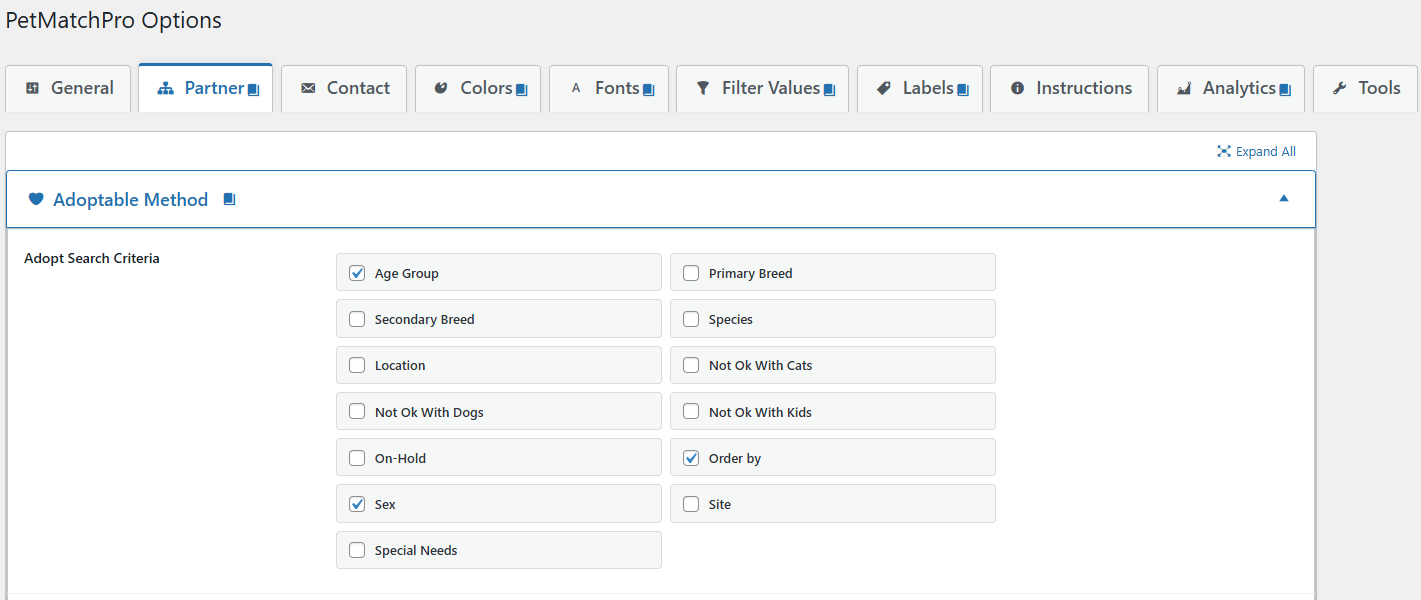
Partner Tab Overview #
The Partner tab is organized into accordion sections by method type. Each section shows the search criteria, sort options, and details fields available for that method type with your integration partner.
| Method Section | License Required |
|---|---|
| Adoptable Method | Basic (Free) |
| Found Method | Junior |
| Lost Method | Junior |
| List Method (PetPoint only) | Junior |
| Preferred Method (AnimalsFirst only) | Preferred |
Within each method accordion you’ll find sub-sections for Search Criteria (which filter checkboxes appear on search pages) and Animal Details (which fields render on the detail page).
Filter-Enabled Templates #
Some search templates include built-in filter widgets, while others do not. Template availability varies by integration partner:
- AnimalsFirst ships dedicated filter-aware templates:
universal-search-filter-widget.php(includes filter dropdowns),universal-search-no-filter.php(no filter controls), anduniversal-search-default.php(default with standard filter support). - PetPoint ships
universal-search-default.phpanduniversal-search-structured.php; filter rendering is driven by the shortcodefilterparameter and the Search Criteria checkboxes configured in the Partner tab. - RescueGroups uses partner-specific search templates; there is no
universal-search-*family for RG search results.
When you enable filters via the shortcode (filter="enable"), PetMatchPro renders the filter form using whichever search criteria are enabled in the Partner tab for that method type.
Available Filter Types #
The specific filters available depend on your integration partner. Common filters include:
- Species — Dog, Cat, Bird, etc.
- Breed — Breed-specific filtering
- Sex — Male, Female
- Age — Baby, Young, Adult, Senior
- Size — Small, Medium, Large
- Color — Primary color filtering
- Status — Available, Pending, etc.
See Partner-Specific Filter Options for details on which filters are available per partner.
Sort Options #
In addition to filters, you can configure how results are sorted:
- Sort Field (Order By) — Which field to sort by (e.g., Name, Date, Breed). Available on all tiers for adopt.
- Sort Order — Ascending or descending. Requires Junior license or higher.
Sort settings can be configured in General Options or overridden per method type in the Partner tab.
Next Steps #
- Species & Breed Filtering — Detailed species/breed filter info
- Partner-Specific Filter Options — Filters available per partner
- Search Filter Button — How the filter form submits


