
Species & Breed Filtering #
PetMatchPro provides two ways to filter animals by species and breed: through the species shortcode parameter (for pre-filtered pages) and through search filter widgets (for visitor-driven filtering).
Shortcode Species Filter #
The species parameter pre-filters search results to show only one species. This is available on all license tiers.
[pmp-search type="adopt" species="Dog"][pmp-search type="adopt" species="Cat"]Use this when you want a dedicated page for a single species (e.g., a “Dogs” page and a “Cats” page).
Search Filter Widgets #
When you enable filters (filter="enable"), visitors can use dropdown menus to filter by species and breed interactively. The species dropdown shows all species available in your shelter system, and the breed dropdown updates based on the selected species.
[pmp-search type="adopt" filter="enable"]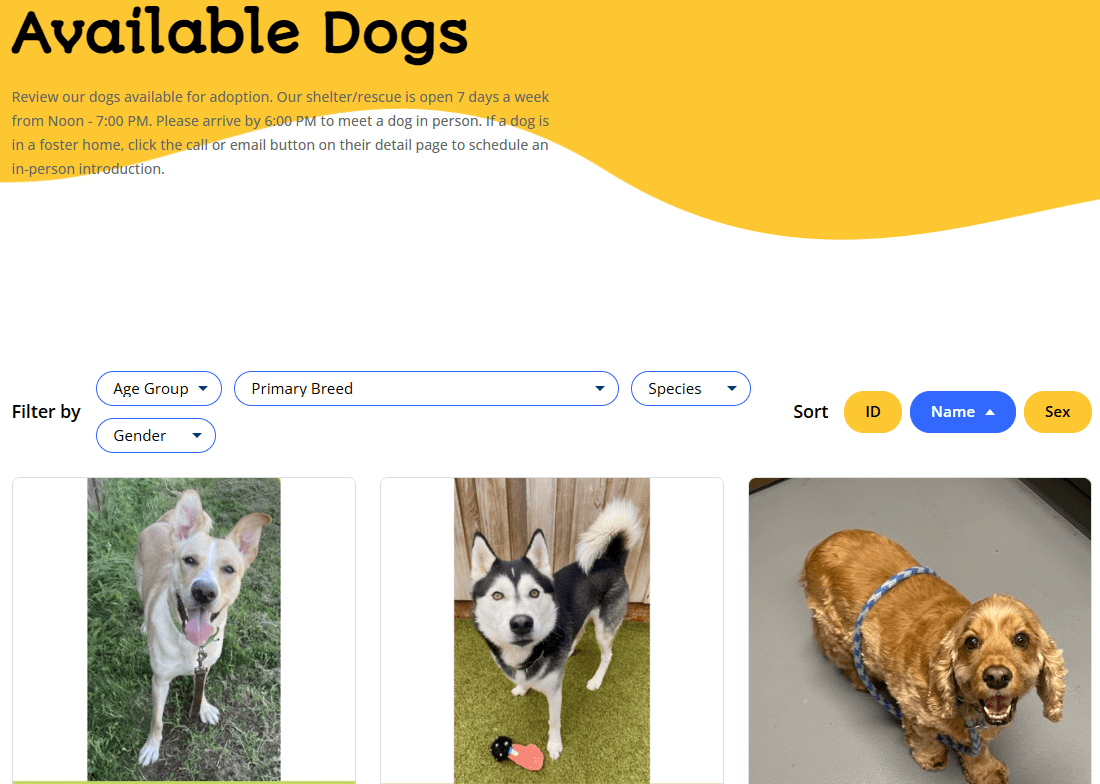
How It Works Per Partner #
PetPoint #
- Species and breed data comes from the PetPoint API based on animals currently in your system
- Breed dropdown is populated with breeds available for the selected species
- Supports filtering across all method types (adopt, lost, found, list)
AnimalsFirst #
- Species and breed values are returned by the AnimalsFirst JSON API
- Breed filtering is available and species-dependent
- Supports filtering for adopt, lost, found, and preferred method types
RescueGroups #
- Species and breed data comes from the RescueGroups JSON API
- Breed values can be refreshed from the API using the Filter Values management tool (Preferred tier)
- Supports adopt method type only
Combining Species Filter with Widgets #
You can combine the species shortcode parameter with filter widgets to create a pre-filtered page that still allows further refinement:
[pmp-search type="adopt" species="Dog" filter="enable"]This shows only dogs but still displays breed, age, and other filter widgets for visitors to narrow results further.
Custom Filter Values #
Requires Preferred license.
With the Preferred tier, you can customize which species and breed values appear in filter dropdowns using the Filter Value Management tool. This lets you remove uncommon species or rename breed labels.
Next Steps #
- Filter Value Management — Customize filter dropdown values
- Excluding Values via Filtering — Hide specific values from results
- Excluding Values (Shortcode) — Per-page exclusions


