
Custom Currency & Date Formats #
PetMatchPro lets you configure how an animal’s age, monetary values (like adoption fees), and dates are displayed on your search and detail pages. These settings are available on all license tiers.
Age Display #
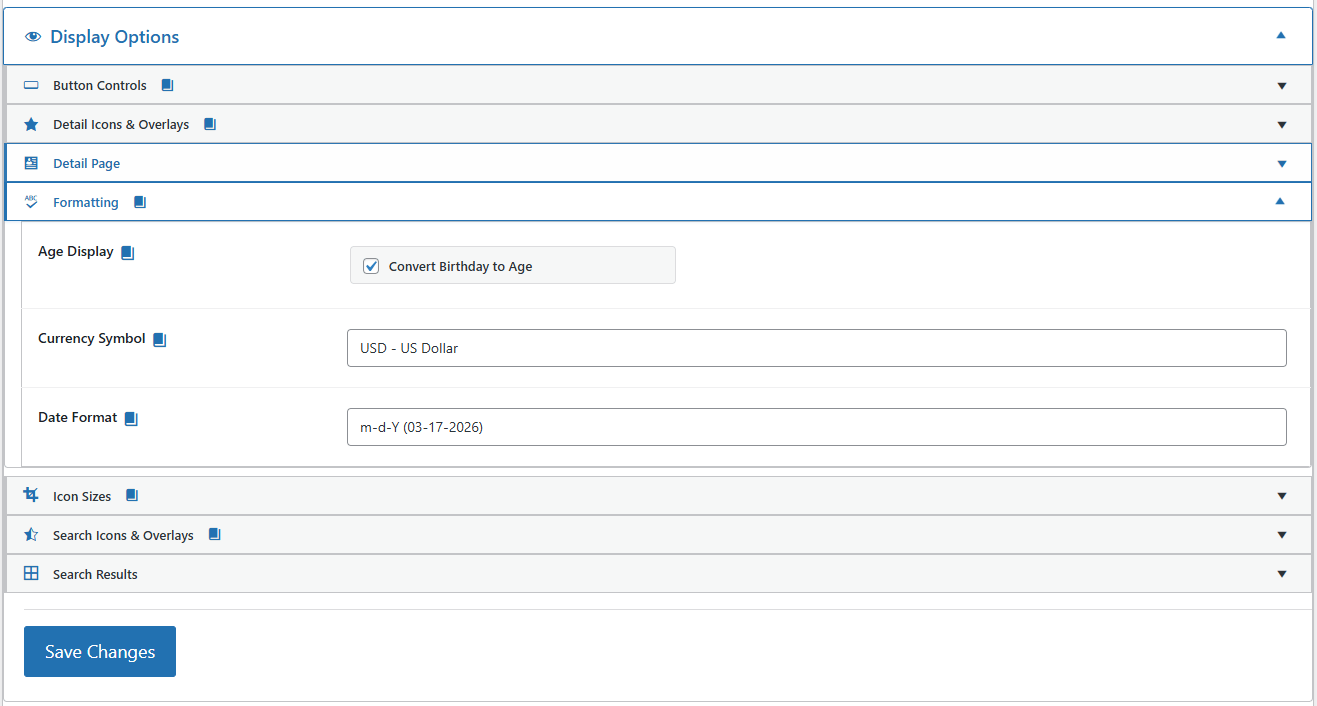
The Age Display setting controls how an animal’s age is shown. The checkbox label
matches your integration partner: Convert Age to Years (PetPoint),
Convert Birth Date to Age (RescueGroups), or Convert Birthday to Age
(AnimalsFirst). When enabled, PetMatchPro turns the raw age (a month count for PetPoint,
a birth date for AnimalsFirst and RescueGroups) into a friendly age.
Years only vs. Years and months #
With the checkbox on, the Age Format selector chooses how the
converted age reads:
- Years only – e.g. 2 Years. Animals under a year
show months (e.g. 5 Months). - Years and months – e.g. 2 Years 3 Months. Exact
years show without a trailing zero (24 months reads 2 Years), and animals
under a year still show months only.
The Age Format selector is only active while the Age Display checkbox is checked. The
setting applies site-wide across all three partners, all method types, and all templates.
AnimalsFirst note: age conversion on AnimalsFirst requires a paid license, so
on the free tier the raw birth date is shown and the Age Format selector has no effect.
Currency Symbol #
The currency symbol setting controls which symbol appears next to monetary fields like adoption fees.
Changing the Currency Symbol #
- Go to PetMatchPro > General Options.
- Expand the Display Options > Formatting accordion.
- Choose your preferred currency from the Currency Symbol dropdown.
- Click Apply Changes.
The default is USD - US Dollar.
Available Currencies #
Five currencies are available in the dropdown. The selected code controls the symbol prefix shown next to monetary values like adoption fees:
| Dropdown Value | Symbol Displayed | Example |
|---|---|---|
USD - US Dollar |
$ |
$150.00 |
GBP - British Pound |
£ |
£150.00 |
EUR - Euro |
€ |
€150.00 |
CAD - Canadian Dollar |
C$ |
C$150.00 |
AUD - Australian Dollar |
A$ |
A$150.00 |
Date Format #
The date format setting controls how date fields display throughout PetMatchPro – including intake dates, outcome dates, birthdays, and any other date values from your shelter system.
Changing the Date Format #
- Go to PetMatchPro > General Options.
- Expand the Display Options > Formatting accordion.
- Choose your preferred format from the Date Format dropdown.
- Click Apply Changes.
The default is m-d-Y (03-17-2026).
Available Date Formats #
Five date formats are available in the dropdown. The selected format applies to all date fields – intake date, outcome date, birthday, and any other date values from your shelter system.
| Dropdown Value | Example Output | Description |
|---|---|---|
m-d-Y |
03-17-2026 | Month-Day-Year (default, US style) |
d-m-Y |
17-03-2026 | Day-Month-Year (UK / EU style) |
Y-m-d |
2026-03-17 | Year-Month-Day (ISO 8601) |
M d, Y |
Mar 17, 2026 | Abbreviated month name |
d M Y |
17 Mar 2026 | Day first, abbreviated month |
Where These Settings Apply #
Currency and date format settings apply site-wide across all templates – search results, detail pages, and poster templates – and across all method types. There is no per-method or per-template override.
The Age Display and Age Format settings apply the same way: site-wide across every template and method type, with no per-method or per-template override.
Next Steps #
- Custom Labels Guide – Rename field labels
- Color Customization – Adjust your visual theme


