
AnimalsFirst Integration Guide #
This guide covers everything specific to using PetMatchPro with AnimalsFirst, including API setup, the unique preferred method type, and the lost/found per-animal labels feature.
API Setup #
AnimalsFirst uses a JSON-based API. You need an API key, and optionally an API source setting.
- Obtain your API key from AnimalsFirst support.
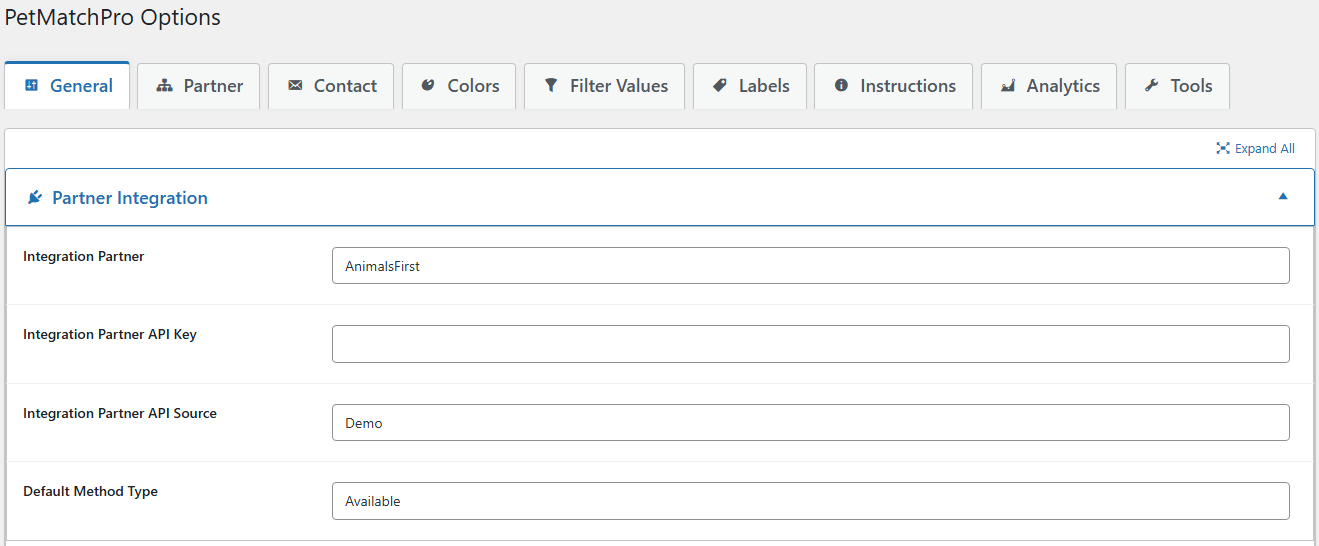
- In WordPress, go to PetMatchPro > General Options.
- Select AnimalsFirst from the Integration Partner dropdown.
- Enter your API key.
- Optionally select an API Source (Junior license required).
- Click Apply Changes.
API Source Setting #
Requires Junior license. The API Source setting is available only for AnimalsFirst. It determines which data source the API pulls from. Your AnimalsFirst representative can advise which source is appropriate for your organization.
Available Method Types #
| Method | License | Description |
|---|---|---|
| Adopt | Basic | Available/adoptable animals |
| Lost | Junior | Lost animal reports |
| Found | Junior | Found animal reports |
| Preferred | Preferred | Featured/priority animals (AnimalsFirst only) |
| Featured | Junior | Featured animal display |
| Lost/Found Combo | Preferred | Combined lost and found search |
AnimalsFirst-Specific Features #
Preferred Method Type #
Requires Preferred license. AnimalsFirst only.
The Preferred method type displays priority or featured animals that your organization wants to highlight. This is different from the regular “Featured” search – it supports additional sub-categories:
- Foster animals
- Stray animals
- Outcome animals
- Pending animals
- Rehome animals
[pmp-search type="preferred"]The preferred method type label can be customized in admin settings to match your organization’s terminology.
Lost/Found Per-Animal Labels #
Requires Preferred license. AnimalsFirst only.
When enabled, PetMatchPro checks each animal’s intake_type field and automatically applies the correct set of labels based on how the animal entered the system:
- Lost intake → Uses Lost method labels
- Found intake → Uses Found method labels
- Other intakes (foster, stray, outcome, pending, rehome) → Uses Preferred method labels
Enable this in the Partner tab under “Lost/Found Per-Animal Labels”.
See Changing Labels via Filtering for more details.
Dynamic Banner Source Field #
Requires Junior license. The AnimalsFirst status field can drive a Dynamic Banner on search cards – map each status value to its own banner label and optional color, with a default fallback for unmatched values.
Address Decomposition #
AnimalsFirst returns address data as a single field. PetMatchPro automatically decomposes this into individual components (street, city, state, ZIP) so they can be displayed separately in templates.
Error Messages #
If an AnimalsFirst search or detail page renders with a red error block instead of animals, the message tells you what to fix:
| Public message | What it means | What to do |
|---|---|---|
| Connection Error: Unable to reach animal database: [network error] | The HTTP request to AnimalsFirst never completed – DNS failure, firewall block, or AnimalsFirst outage. | Try again in a few minutes. If it persists, check your hosting provider’s outbound HTTP rules. |
| Authentication Error: AnimalsFirst rejected the request (HTTP 401). Verify your API key in general Settings. | AnimalsFirst received the request but rejected your API key. Most common causes: typo on paste, expired key, or a key issued for a different API source. | Go to PetMatchPro > General Options and re-enter your API key. Confirm the API Source setting matches what your AnimalsFirst representative recommends. Click Apply Changes. |
| API Error: AnimalsFirst returned HTTP [code]. The service may be temporarily unavailable. | AnimalsFirst returned a non-401/403 server error. | Wait and retry. If it persists, contact AnimalsFirst support. |
| API Error: AnimalsFirst returned an error: [error from AnimalsFirst] | AnimalsFirst returned 200 OK but the JSON body contained an explicit error message. | The error text comes straight from AnimalsFirst – it usually identifies the problem (invalid filter, missing field, etc.). Adjust the configuration accordingly. |
| Parse Error: AnimalsFirst returned a response that could not be parsed as JSON ([json error]). This is usually a temporary API issue; if it persists, verify your API key in general Settings. | AnimalsFirst returned a 200 OK but the body wasn’t valid JSON. Genuinely rare. | Refresh the page once. If the error persists across multiple refreshes, treat it like an Authentication Error and re-verify the API key. |
With WP_DEBUG enabled, every error path also writes a structured entry to your debug log with the HTTP status code and the first 200 characters of AnimalsFirst’s response body. See the Reading PMP Debug Logs article for how to find and interpret these entries.
Available Templates #
Search Templates #
universal-search-default.php– Default (Basic)universal-search-filter-widget.php– With filter widgets (Basic)universal-search-no-filter.php– Without filters (Basic)universal-search-structured.php– Structured grid (Junior)featured-search-default.php,featured-search-carousel.php,featured-search-compact.php– All Juniorfeatured-search-hero.php– Featured single hero image (Junior)
Detail Templates #
adopt-default.php– Default (Basic)adopt-wide.php,adopt-conversion.php,adopt-conversion-no-app.php,adopt-conversion-similar.php,adopt-celebration-similar.php,adopt-details-navigation-similar.php– All Junioradopt-profile-3-column.php,adopt-profile-3-column-similar.php– Junior (AF only)found-default.php,lost-default.php– Junioruniversal-details-navigation.php– Junior
AnimalsFirst-Only Templates #
The 3-Column Profile templates are exclusive to AnimalsFirst, providing an organized three-column layout for animal details.
Search Result Limits #
The AnimalsFirst API returns up to 250 animals per request. PetMatchPro controls the total number of animals returned to a search using the Search Result Limit setting (General Options tab, Requires Junior license).
- If Search Result Limit is 250 or less, PetMatchPro issues a single API request.
- If Search Result Limit is greater than 250, PetMatchPro automatically issues additional paginated requests (page 2, page 3, etc.) and merges the results until the configured limit is reached or the shelter has no more matching animals.
If you want more than 250 animals to appear in a single search, increase the Search Result Limit value. Higher limits mean more API calls per page load, which can slow down search results – tune this value to match how many animals you actually want visitors to see at once.
Next Steps #
- Connecting Your Shelter System – Quick setup steps
- PetPoint Integration Guide – Compare with PetPoint
- RescueGroups Integration Guide – Compare with RescueGroups


